3D Workspace
Home
Assets
Affiliate Program
Sign up/Log in
?
Upgrade
DCC Bridge
Anonymous1775554130
04-07 09:50
Model Name
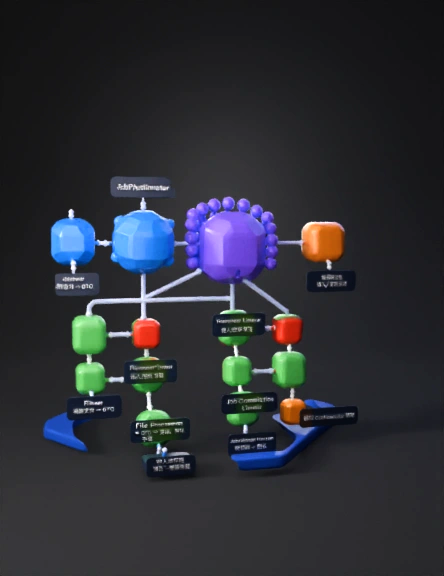
data pipeline 3d model
Tags
architecture
simulation
stylized
Prompt
Create a detailed 3D low-poly scene representing a scalable file ingestion pipeline architecture. The scene should be clean, modern, and suitable for a technical system design visualization. Layout: Use a left-to-right horizontal pipeline with depth (Z-axis) to represent parallel processing. Maintain clear spacing, symmetry, and readability. Use a dark theme with soft lighting and minimalistic design. Main Flow Components: 1. JobRunner (small cube, entry point on far left) - Include floating text elements: fileName, fileType, lineCount, fileId, executionDate 2. JobConfiguration (medium cube next to JobRunner) - Display configuration attributes: gridSize, chunkSize, retryLimit, maxSkipCount - Styled as a control/configuration hub 3. JobPartitioner (larger cube) - Visually split into multiple outgoing paths - Surround with a cluster of small spheres representing a thread pool Parallel Processing Layer: - Create 3–4 parallel lanes extending from JobPartitioner - Arrange lanes vertically or along depth (Z-axis) to show concurrency Each lane contains: - FileReader (cube) with label “Read file → DTO” - FileProcessor (cube) with label “DTO → Entity, Validation, Enrichment” - FileWriter (cube) with label “Insert / Select-Update” Side Components: - ProcessorListener (small red node near FileProcessor) labeled “Error Log” - WriterListener (small red node near FileWriter) labeled “Retry + Error Log” Final Stage: - Merge all lanes into JobCompletionListener (cube) Label: “Checksum + Status” - Connect to JobStatusNotifier (final node) Label: “Notify Orchestrator Service” Connections: - Use smooth 3D pipes or glowing lines to connect components - Show branching from JobPartitioner to parallel lanes - Show merging flow into completion stage - Include side connections for error/retry listeners Styling: - Use rounded cubes and soft edges - Apply color coding: Blue for control (JobRunner, JobConfiguration) Purple for JobPartitioner and thread pool Green for processing components (Reader, Processor, Writer) Red for listeners (error/retry) Orange for completion and notifier - Add subtle glow or emissive materials for active flow paths Scene Details: - Include a base platform/grid for alignment - Add depth and shadows for realism - Maintain a clean, uncluttered look (avoid excessive detail) - Ensure all labels are readable and well-positioned Goal: The final 3D model should clearly represent a multi-threaded batch ingestion system with parallel execution, error handling, retry logic, and final job status notification, suitable for presentations and architecture visualization. refine : - "reduce object density, increase spacing, focus on clarity". - "include clear text labels on each component" . - "use simple cubes and geometric primitives only".
Detailed Info
Related Models
Enter invite code
Enter invite code to get credits!
 Anonymous1775554130


 Anonymous1775554130